
About
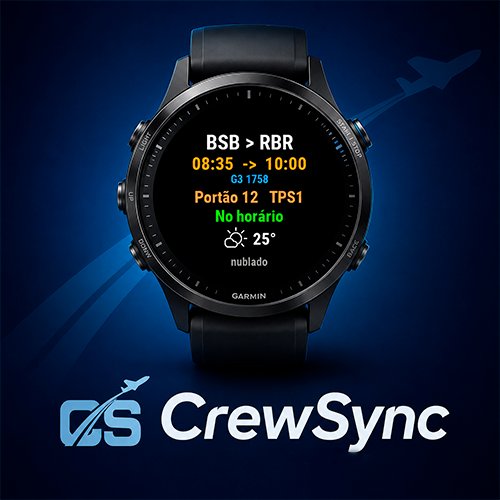
See at a glance:
• Today's and tomorrow's duties on the home screen - Your next flight: route, departure/arrival, aircraft and flight number - Full schedule, day by day - Gate and live flight status (on time, delayed, boarding) - Weather at your destination airport - Ground events (standby, reserve, training, day off) with start/end times - Quick-glance card with your next activity
CrewSync is FREE. To use it you need the CrewSync phone app (iPhone/Android) with your schedule imported, plus an active Premium subscription, which unlocks syncing your schedule to the watch.
How to connect:
1. Open CrewSync on your watch — it shows a 6-character code. 2. In the CrewSync phone app: Settings → Integrations → Connect Garmin watch. 3. Type the code. Done — your schedule appears on the watch.
Built for GOL, LATAM, Azul and ABX crews.
Note: the watch interface is in Portuguese (Brazil).
Screenshots
What Users
"Practical, intuitive, and functional; very simple to use and covers all a crew member's needs. It handles salary and per diem calculations, meal logs, and cross-referenced schedules, and provides alerts for landing times, gate info, and much more. One of the best apps for tracking your schedule."
"There is no better app than this one for crew members! All the necessary functions are available right in the palm of your hand, offering great convenience. I recommend it to everyone! Kudos to the developer(s)."
"Flávio is incredibly attentive and always willing to further improve the app. Congratulations on the work! :)"