
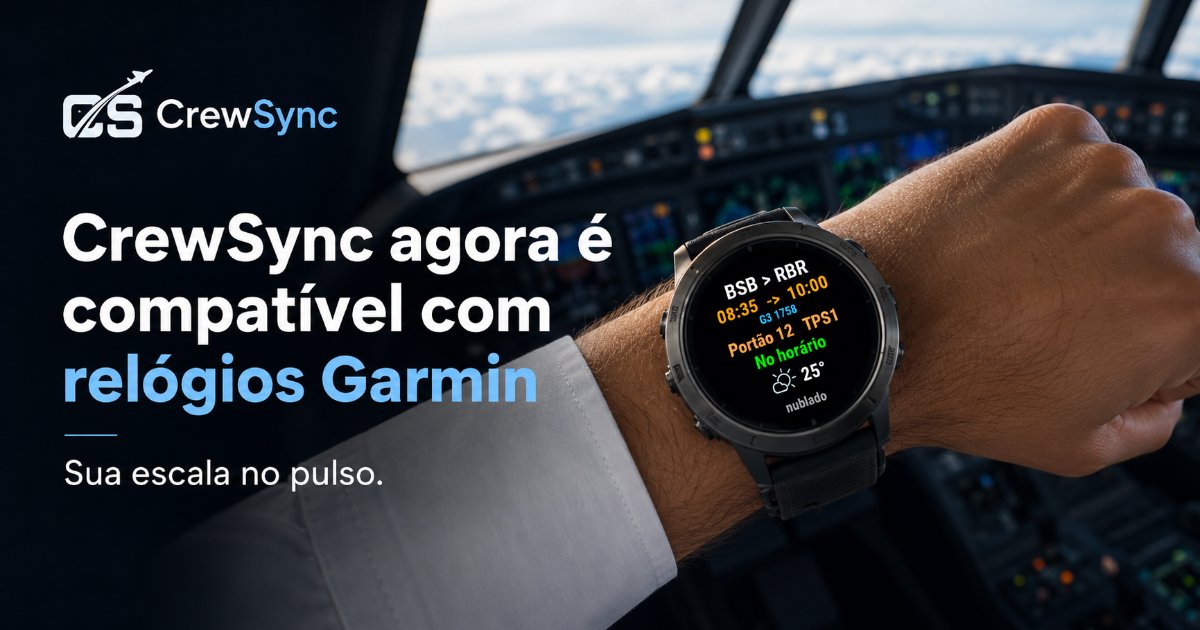
CrewSync now works with Garmin watches
Your flight schedule, now on your wrist. CrewSync is live on Garmin's Connect IQ Store — see your next flight, full roster, leg details, gate and destination weather. Here's how to install, connect your watch and which models are supported.
🎉 CrewSync now works with Garmin watches!
Your flight schedule, right on your wrist. CrewSync is live on Garmin's Connect
IQ Store — check your next flight, full roster, leg details, gate and destination
weather without reaching for your phone.
HOW TO DOWNLOAD
1. On your Garmin watch, open the Connect IQ Store (or the Garmin Connect app on
your phone) and search for "CrewSync".
2. Install the app on your watch (it's free).
3. Open CrewSync on the watch — it shows a 6-digit code.
4. In the CrewSync phone app, go to Settings › Integrations › Connect Garmin
watch, enter the code, and you're done.
HOW TO USE
- Your schedule syncs automatically (Premium feature in the phone app).
- See today/tomorrow on the main screen and your full day-by-day roster.
- Tap a flight for route, times, aircraft, gate and status.
COMPATIBILITY
Works with fēnix 6/7/8, epix (Gen 2)/epix Pro, Forerunner 165/255/265/955/965/
970, Venu 2/3, vívoactive 4/5 and the D2 (pilot) series, among others. The full,
up-to-date list is on the app's Connect IQ Store page. Don't see your model? Reach
out and tell us your watch — we'll look into adding it.
👉 Download now:
https://apps.garmin.com/en-US/apps/4562be5e-cefd-41b0-82dd-e5896ad0fe96?tid=1